NotJS
Why
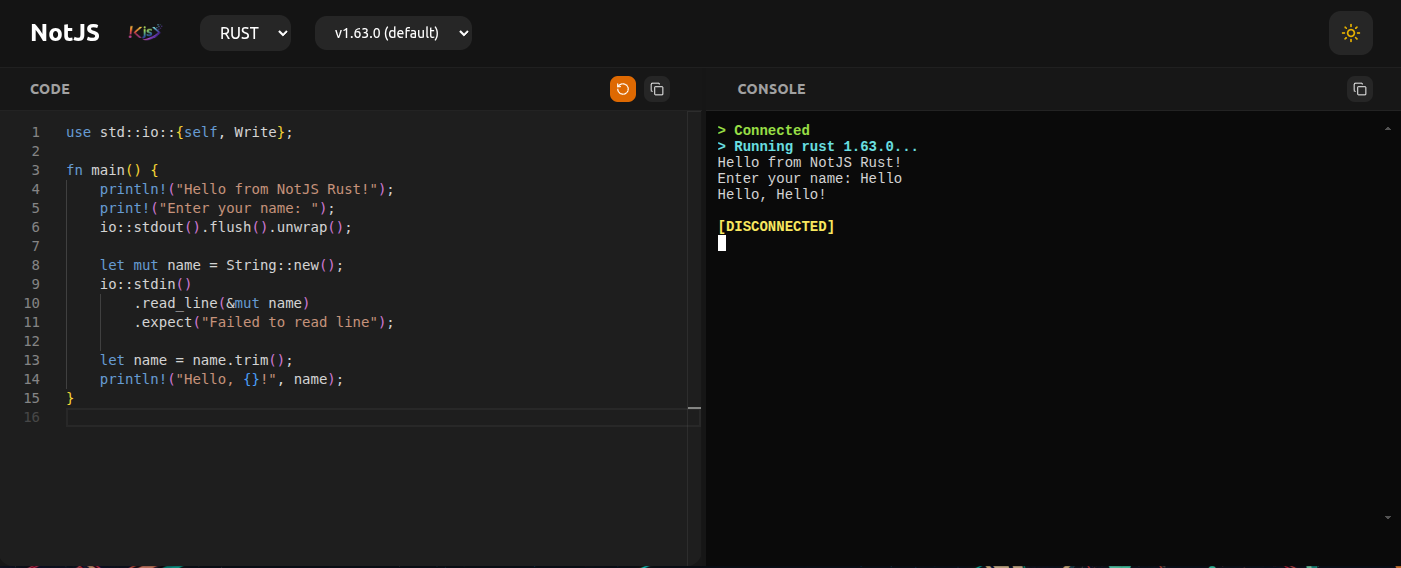
Since I started this blog, I’ve always had the urge to demonstrate some language features. I believe it makes the articles more interactive and engaging. Unfortunately, the playground I was using is based on Codesandbox and doesn’t support compiled languages like Java. I needed a solution, and thus NotJS was born.
Now I can demonstrate new Java features simply by installing the new version in the image. At this time, it only supports LTS versions, but in the future, we can let it install any version since it has SDKMAN installed.
How NotJS works
NotJS utilizes a Docker image running a Spring Boot app which exposes WebSocket and REST API endpoints. The REST endpoint is used to query installed languages and their available versions. The WebSocket is used to send the payload of the program to execute, which comes from the code entered in the Monaco editor. Moreover, WebSocket is used to gather input in xterm.js and send it to the backend for the process expecting it. We receive the program’s output via WebSocket, and xterm.js prints it out. That’s the basic concept. It consists of a Spring Boot backend and a React library.
I’m well aware this isn’t very secure because there’s a large potential for code execution. As a result, I run the API and demo on a cheap $5 USD per month server with nothing critical residing on it.
The Process
Without a doubt, as of 2025, AI is what everyone is talking about. Claude Code (CC) was used to assist in building NotJS. I was able to achieve a tremendous amount of progress in such a short time. Within a week, I had the concept working. However, all this came at a price. I ended up spending at least $50 AUD over two weeks on Claude, but it was worth it in the end.
I saw myself more like an architect deciding where things should go and which patterns to use. The backend process was more forgiving and actually took less time. The frontend, on the other hand, was, for lack of a better word, a clusterfuck.
In the end, I held the concept in my head—being aware that I could install tools in the Docker image, e.g., C/C++, Java, Go, and Rust compilers. I was also aware that we would need to use WebSocket to communicate with the web terminal emulator xterm.js. This gave me technical oversight. Claude would make a change and ask for my approval. It would then use my judgment to decide whether what it did was correct.
My guilty pleasure of a backend framework is, of course, Spring Boot. It made setting up WebSocket and a REST API easy.
To aid with debugging, I installed Playwright MCP, and Claude Code was able to invoke it to inspect the UI and make changes accordingly. This dramatically helped me fix many cosmetic issues with the React library.
My editor of choice was IntelliJ IDEA 2025.3—it has integration with Claude Code, which made editing a breeze.
What I learned
Always read official API docs
I learned that AI sometimes uses outdated APIs or ways of doing things in a library. For instance, in Spring 7, ObjectMapper is no longer available, and I had to switch to another method introduced in Jackson 3. So I learned it’s important to always double-check the official docs of a language, especially for libraries or frameworks that update frequently. This is a limitation of AI training data.
Playwright MCP is your friend
Playwright MCP helped me heaps because it allowed Claude Code to inspect the HTML and fix some cosmetic issues.
Get used to using multiple AI tools
Claude Code’s training might sometimes be behind. Occasionally, I’d switch to ChatGPT or Gemini when debugging.
Don’t be a conformist
Claude Code had recommended a tooltip library for React that proved hard to work with. After hours of debugging it, I decided to switch it out for something a little easier. You are free not to accept whatever suggestions it makes for libraries.
Yes, StackOverflow is still relevant
I ran into situations where sometimes LLMs have no clue what’s going on, and StackOverflow still helps in some cases. A rule of thumb now is to use whatever tool you can get to help you troubleshoot.
AI seems to be good at UI
I sketched a layout wireframe and gave it to CC, and it got it 70% right. CC struggled to make it look more modern and rounded. So I turned to Gemini and ChatGPT, which seemed to be more aware of Tailwind 4. I understand CSS to a degree, but it’s pesky, and many so-called Full Stack Developers loathe it. Thus, writing UI with LLMs might indeed be the future.
Make regular commits
I often ran into issues where I let CC make many changes and get the app to a working state, but then I’d make more changes on top that would break things. If the new changes were made in many places, it’s hard to reverse them. However, if you commit a working state, you can easily recover.
A good framework saves you effort
Since I had implemented strategy patterns for the different language executors, I thought I had to register each new executor in the factory.
However, Spring Boot’s dependency injection system saved me from doing this since each executor was annotated with @Component:
@Slf4j
@Component
public class ExecutorFactory {

    private final Map<String, NotJSExecutor> executors;

    public ExecutorFactory(List<NotJSExecutor> executorList) {
        this.executors = executorList.stream()
                .collect(Collectors.toMap(
                        NotJSExecutor::getLanguage,
                        Function.identity()
                ));
        log.info("Registered language executors: {}", executors.keySet());
    }
The Spring code above gives us all the implementations of NotJSExecutor. It was neat!
AI rarely gives complete solutions
I had a situation where each time a websocket session was started, temporary files were created. For each of the languages. These files were filling up the disk. I realised I needed code to clean them up. Claude didn’t even suggest this feature. So it really is a co-pilot and doesn’t understand your domain or constraints very well unless you tell it.
What I would do differently
Don’t be lazy! Save tokens
Sometimes I would let Claude Code go ahead and make changes across several files that I could have done myself, since it’s the same kind of concept that needs to be repeated for the other files.
Don’t make security an afterthought
Nowadays, developers want to start a project with AI guns blazing. This is a huge issue because we’ve heard in headlines how many vibe-coded apps have security issues. We need to start with a security mindset and think of our threat models. While building this app, I had thought about how to prevent my API from being abused. CORS and firewall rules have been implemented, but they’re not robust. The number one issue remains remote code execution. If I start this again, I would think more thoroughly about how to prevent malicious code execution. However, I’m not too concerned as the server isn’t critical.
Design the UI in Figma, Bolt or v0
Next time, I think I should let tools that are more suited for UI design the React component. The one sketch I did wasn’t good enough, and I was left fixing many cosmetic issues with the UI.